Combat basics: reading targets, attacking, and when you become vulnerable
- At Ops 10 your ships can fight other players' ships and be attacked. At Ops 15 Station Combat opens and your station can be attacked.
- Red labels are hostiles, blue are other players' ships, yellow with a marker are mission targets, and triangles are Armadas.
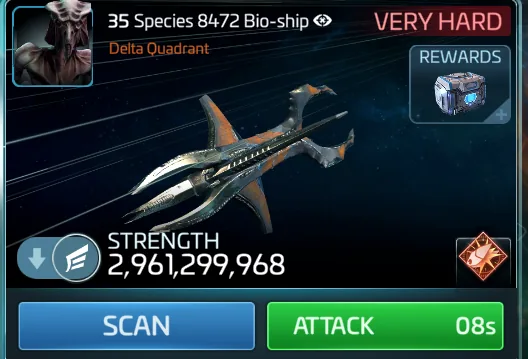
- Tap a target to see its difficulty. No ATTACK button means the target is not valid for you.
This guide is for players around Ops 10 to 15. At Ops 10, your ships can battle other players' ships. At Ops 15, you unlock Station Combat.
In System view, targets are coded by color and shape. Roaming hostile ships have red labels. Other players' ships have blue labels. Other players' stations sit near housing planets in some systems. Mission combat targets have yellow labels with a mission marker. Swarm hostiles are stronger groups, also in red. Armadas use triangular icons in various colors. They may look like stations. They need teamwork with your Alliance, so do not attack one alone.
Tap a target in System view to open its preview. It shows type, strength and estimated difficulty. Tap SCAN for more detail. Tap ATTACK to send your selected ship into battle. Only valid targets show an ATTACK button.
Until Ops 10 you are protected: you cannot attack other players' ships and they cannot attack yours. After Ops 10, your ships are vulnerable when roaming or idle in System view. You can only attack players whose Ops level is close to yours. Station vulnerability starts at Ops 15.
At Ops 15, tap an enemy station to attack it with your selected ship. Stations have their own defenses, and docked ships join the fight. Defeating one can take several attempts. After a station is attacked, a 10-minute Peace Shield starts on it automatically. You cannot attack stations of your own Alliance members. The Station Safety guide covers shields and Ceasefire.
Armadas need coordination with your Alliance. Attacking one alone is a fast way to lose a fleet for no reward. The Armada guides cover joining and rewards.